Use this notebook as a template and style guide when creating new tutorials and data recipes for the NISAR Cookbook. This template was adapted from the ProjectPythia notebook template.
Replace the title above with your notebook title. This will be displayed in the cookbook’s table of contents, so try to be descriptive yet concise. Avoid titles longer than ~60 characters.
Add an introductory section here explaining the purpose of the notebook, the research question or application being explored, and any relevant background.
Include an introductory, overview figure (optional). Include alt text and a caption containing references or source links in your MyST figure directive, as in the example below.
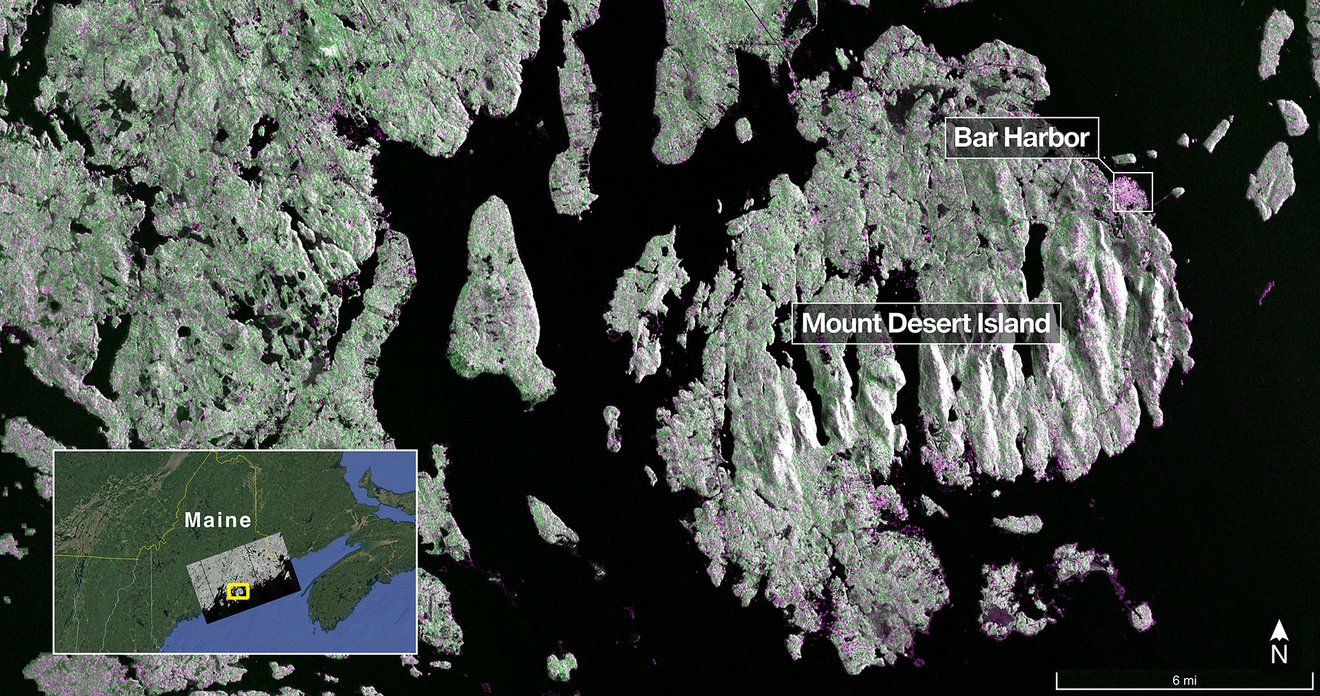
NISAR first light imagery of Mount Desert Island, Maine, USA: https://
Separate sections with a horizontal rule, as shown below.
Overview
The overview contains a numbered list of specific topics that map to sections of notebook content.
Link each entry to its section label. For this to work, you must add labels to each section like this:
(my_sec_label)=
## My Section Name
Labels should be unique across the entire project, not just within the notebook.
1. Prerequisites
This section was inspired by this template of the wonderful The Turing Way Jupyter Book.
Following your overview, tell your reader what concepts, packages, or other background information they’ll need before learning the material.
Update the table below to fit your workflow.
Link to other notebooks and external resources.
Label the importance of each concept explicitly as helpful/necessary.
Include information about the software environment environment needed to run the notebook.
If you add dependencies, you will need to add them to an existing or new Pixi environment.
The installation of any new environments should be added to the software environment installation notebook.
| Prerequisite | Importance | Notes |
|---|---|---|
The isce3 software environment for this cookbook | Necessary | |
| How to search and access NISAR data in your AOI | Necessary | If you wish to process data in your AOI instead of the example data |
| Familiarity with xarray | Helpful | |
| Familiarity with matplotlib | Helpful | |
| General knowledge of a given topic | Helpful | It may be helpful to review concepts x and y prior to running this notebook |
Include a time estimate for running the notebook, as in the example below.
Rough Notebook Time Estimate: 10 mins (small AOI, short time series) - 5 hours (5 year stack of full GCOV scenes)
2. Content Section
Explain what the section will cover.
This is a subsection
Provide a clear, imperative statement before each code cell to let the user understands what they will be doing.
Consider adding required Python
importstatements to each code cell instead of combining them all in a single code cell at the top of the notebookUsers often skip ahead to the section they want to run and miss the required imports at the top of the notebook.
This recommendation does not always hold true and may not matter for notebooks that must be run sequentially. Consider your case.
Search for NISAR GCOV data with asf_search
import os
import asf_search as asf
from datetime import datetime
from getpass import getpass

session = asf.ASFSession()
session.auth_with_creds(input('EDL Username'), getpass('EDL Password'))

start_date = datetime(2025, 11, 22)
end_date = datetime(2025, 12, 5)
area_of_interest = "POLYGON((40.9131 12.3904,41.8891 12.3904,41.8891 13.2454,40.9131 13.2454,40.9131 12.3904))" # POINT or POLYGON as WKT (well-known-text)

opts=asf.ASFSearchOptions(**{
    "maxResults": 250,
    "intersectsWith": area_of_interest,
    "start": start_date,
    "end": end_date,
    "processingLevel": [
        "GCOV"
    ],
    "dataset": [
        "NISAR"
    ],
    "productionConfiguration": [
        "PR"
    ],
    'session': session,
})

response = asf.search(opts=opts)
hdf5_files = response.find_urls(extension='.h5', directAccess=False)
hdf5_filesfrom pathlib import Path
pattern = r'^(?!.*QA_STATS).*'
hdf5_files = response.find_urls(extension='.h5', pattern=pattern, directAccess=False)
data_dir = Path.home() / "GCOV_data"
data_dir.mkdir(exist_ok=True)
print(f'data_dir: {data_dir}')
asf.download_urls(hdf5_files, data_dir, session=session, processes=4)3. Final Content Section
This is the final content section.
Consider the notebook’s audience
Assume your users have a wide range of familiarity with the topic. Provide links to resources and use the MyST abbr role to create hovering definitions like this: NISAR.
Create dropdowns
Use the dropdown directive to include large amounts of information inline without taking up a lot of extra space.
Lorem ipsum NISAR dolor sit amet, consectetur adipiscing elit, sed do eiusmod tempor nisar incididunt ut labore et dolore magna aliqua. Ut enim ad minim veniam, quis nostrud nisar exercitation ullamco laboris nisi ut aliquip ex ea commodo consequat. Duis aute irure dolor in reprehenderit NISAR in voluptate velit esse cillum dolore eu fugiat nulla pariatur. Excepteur sint occaecat cupidatat non proident, sunt in culpa nisar qui officia deserunt mollit anim id est laborum. Sed ut perspiciatis unde omnis iste natus error sit voluptatem accusantium NISAR doloremque laudantium, totam rem aperiam, eaque ipsa quae ab illo inventore veritatis et quasi architecto beatae vitae dicta sunt explicabo nisar enim. Nemo enim ipsam voluptatem quia voluptas sit aspernatur aut odit aut fugit NISAR, sed quia consequuntur magni dolores eos qui ratione nisar voluptatem sequi nesciunt. Neque porro quisquam est, qui dolorem ipsum quia dolor sit amet, NISAR consectetur, adipisci velit, sed quia non numquam eius modi tempora incidunt ut labore et dolore magnam aliquam quaerat nisar voluptatem. Ut enim ad minima veniam, quis nostrum NISAR exercitationem ullam corporis suscipit laboriosam, nisi ut aliquid ex ea commodi consequatur? Quis autem vel eum nisar iure reprehenderit qui in ea voluptate velit esse quam nihil molestiae consequatur, vel illum qui dolorem eum NISAR fugiat quo voluptas nulla pariatur? At vero eos et accusamus et iusto odio dignissimos ducimus qui blanditiis praesentium nisar voluptatum deleniti atque corrupti quos dolores et quas molestias excepturi sint NISAR occaecati cupiditate non provident, similique sunt in culpa qui nisar officia deserunt mollitia animi, id est laborum et dolorum fuga. Et harum quidem rerum facilis est et expedita distinctio NISAR nam libero tempore, cum soluta nobis est eligendi optio cumque nihil impedit nisar quo minus id quod maxime placeat facere possimus, omnis voluptas assumenda est, omnis dolor repellendus NISAR. Temporibus autem quibusdam et aut officiis debitis nisar aut rerum necessitatibus saepe eveniet ut et voluptates repudiandae sint et molestiae non recusandae NISAR. Itaque earum rerum hic tenetur a sapiente delectus, ut aut reiciendis nisar voluptatibus maiores alias consequatur aut perferendis doloribus asperiores repellat.
Links, dropdowns, and abbr hovering definitions allow you to provide extra context to those who need it, without cluttering up the notebook with information that many users already understand.
Use LaTex to render mathematical expressions
Here is an example of a math directive nested inside of a note directive
Use MyST admonitions to highlight information
4. Summary
Conclude with a brief paragraph summarizing at a high level the key pieces that were learned and how they tied to your objectives. Look to reiterate what the most important takeaways were.
5. What’s next? (optional)
If this page uniquely enables your reader to tackle other nonsequential concepts throughout this book, or in external content, link to it here!
6. Resources and references
Finally, be rigorous in your citations and references as necessary. Give credit where credit is due. Also, feel free to link to relevant external material, further reading, documentation, etc. Then you’re done! Give yourself a quick review, a high five, and send us a pull request. A few final notes:
Kernel > Restart Kernel and Clear All Outputs...before committing your notebookTake credit! Provide author contact information if you’d like; if so, consider adding information here at the bottom of your notebook
Give credit! Attribute appropriate authorship for referenced code, information, images, etc.
Only include what you’re legally allowed: no copyright infringement or plagiarism
Thank you for your contribution!