asf_search is an open source Python package for searching the SAR data archived at ASF. This notebook demonstrates how to search NISAR data with the asf_search Python package, stream them directly over HTTPS or from Amazon S3 using s3fs, and load them into xarray data structures.
Some NISAR data products are very large. It is useful to access subsets of the data directly from S3, avoiding the download of large data products to local storage. This notebook demonstrates how to lazily load data into xarray data structures, subset them, and perform queued operations on them with xarray. Streamed data is stored in memory rather than on a volume, so your system must have enough RAM to hold your subset and run your workflow.
Overview
1. Prerequisites
| Prerequisite | Importance | Notes |
|---|---|---|
| The software environment for this cookbook must be installed | Necessary |
Rough Notebook Time Estimate: 10 minutes
2. Search for data
Use asf_search to find NISAR data.
2a. Identify an Area of Interest (AOI)
Use the interactive map below to generate well-known-text (WKT) of your AOI. Copy the wkt and update the area_of_interest variable in the next code cell.
Try refreshing the browser tab if you have issues displaying the interactive map.
from pathlib import Path
import sys
project_root = Path.cwd().parent
sys.path.insert(0, str(project_root))

from util.aoi_coverage import plot_aoi_coverage
from util.wkt import rectangular_aoi_select, rectangular_wkt_bounds

aoi_map = rectangular_aoi_select()
print("Click the ■ button to select an area of interest\n")
display(aoi_map["map"])
Click the ■ button to select an area of interest
2b. Set some search arguments
Change the values in the cell below to search different NISAR products, date ranges, and AOIs.
from datetime import datetime

start_date = datetime(2025, 11, 22)
end_date = datetime(2028, 3, 5)
area_of_interest = "POLYGON((-90.31002 29.902604, -90.250797 29.902604, -90.250797 29.924476, -90.31002 29.924476, -90.31002 29.902604))" # POINT or POLYGON as WKT (well-known-text)
pattern = r'^(?!.*QA_STATS).*'

product_type = "GCOV" # "RSLC", "RIFG", "RUNW", "ROFF", "GSLC", "GCOV", "GUNW", "SME2", "GOFF"
2c. Perform an asf_search.search() to retrieve data URLs
import os
import asf_search as asf
from pprint import pprint

import warnings
warnings.filterwarnings(
    "ignore",
    message="Parsing dates involving a day of month without a year specified",
)

session = asf.ASFSession()

opts=asf.ASFSearchOptions(**{
    "maxResults": 250,
    "intersectsWith": area_of_interest,
    "flightDirection": "ASCENDING",
    "start": start_date,
    "end": end_date,
    "processingLevel": [product_type],
    "dataset": ["NISAR"],
    "productionConfiguration": ["PR"],
    "dataMaturity" : "PROVISIONAL",
    'session': session,
})

response = asf.search(opts=opts)
urls = response.find_urls(extension='.h5', pattern=pattern, directAccess=False)
print(f"Found {len(urls)} {product_type} products:")
pprint(urls)
Found 6 GCOV products:
['https://nisar.asf.earthdatacloud.nasa.gov/NISAR/NISAR_L2_GCOV_PROVISIONAL_V1/NISAR_L2_PR_GCOV_023_105_A_017_4005_DHDH_A_20260621T111906_20260621T111941_P05023_N_F_J_001/NISAR_L2_PR_GCOV_023_105_A_017_4005_DHDH_A_20260621T111906_20260621T111941_P05023_N_F_J_001.h5',
'https://nisar.asf.earthdatacloud.nasa.gov/NISAR/NISAR_L2_GCOV_PROVISIONAL_V1/NISAR_L2_PR_GCOV_024_105_A_017_4005_DHDH_A_20260703T111905_20260703T111940_P05023_N_F_J_001/NISAR_L2_PR_GCOV_024_105_A_017_4005_DHDH_A_20260703T111905_20260703T111940_P05023_N_F_J_001.h5',
'https://nisar.asf.earthdatacloud.nasa.gov/NISAR/NISAR_L2_GCOV_PROVISIONAL_V1/NISAR_L2_PR_GCOV_025_105_A_017_4005_DHDH_A_20260715T111905_20260715T111940_P05023_N_F_J_001/NISAR_L2_PR_GCOV_025_105_A_017_4005_DHDH_A_20260715T111905_20260715T111940_P05023_N_F_J_001.h5',
'https://nisar.asf.earthdatacloud.nasa.gov/NISAR/NISAR_L2_GCOV_PROVISIONAL_V1/NISAR_L2_PR_GCOV_026_105_A_017_4005_DHDH_A_20260727T111904_20260727T111939_P05023_N_F_J_001/NISAR_L2_PR_GCOV_026_105_A_017_4005_DHDH_A_20260727T111904_20260727T111939_P05023_N_F_J_001.h5',
'https://nisar.asf.earthdatacloud.nasa.gov/NISAR/NISAR_L2_GCOV_PROVISIONAL_V1/NISAR_L2_PR_GCOV_028_105_A_017_4005_DHDH_A_20260820T111903_20260820T111938_P05023_N_F_J_001/NISAR_L2_PR_GCOV_028_105_A_017_4005_DHDH_A_20260820T111903_20260820T111938_P05023_N_F_J_001.h5',
'https://nisar.asf.earthdatacloud.nasa.gov/NISAR/NISAR_L2_GCOV_PROVISIONAL_V1/NISAR_L2_PR_GCOV_029_105_A_017_4005_DHDH_A_20260901T111903_20260901T111937_P05023_N_F_J_001/NISAR_L2_PR_GCOV_029_105_A_017_4005_DHDH_A_20260901T111903_20260901T111937_P05023_N_F_J_001.h5']
2d. Retain only the URL for the most recent version of each product in the search results
During the cal/val period, data is occasionally released with an updated version. Versions are recorded as a Composite Release Identifier (CRID) in a product’s filename. We can use the CRID to retain only the most recent version of each product in the list of URLs.
import re
from util.aoi_coverage import plot_aoi_coverage

pattern = re.compile(r"(NISAR_L[123]_PR_[GRS][COSUIM][OFLNE][CGFVW2](?:_[^_]+){9,11})_([PX]\d{5})")

latest_version_dict = {}

for url in urls:
    m = pattern.search(url)
    if not m:
        continue

    product, crid = m.groups()
    if product not in latest_version_dict or crid > latest_version_dict[product][0]:
        latest_version_dict[product] = (crid, url)

urls = [i[1] for i in latest_version_dict.values()]
print(f"Retained {len(urls)} {product_type} products:")
pprint(urls)

gpolygons = [r.umm['SpatialExtent']['HorizontalSpatialDomain']['Geometry']['GPolygons'][0] for r in response]
display(plot_aoi_coverage(gpolygons, area_of_interest, product_type))
Retained 6 GCOV products:
['https://nisar.asf.earthdatacloud.nasa.gov/NISAR/NISAR_L2_GCOV_PROVISIONAL_V1/NISAR_L2_PR_GCOV_023_105_A_017_4005_DHDH_A_20260621T111906_20260621T111941_P05023_N_F_J_001/NISAR_L2_PR_GCOV_023_105_A_017_4005_DHDH_A_20260621T111906_20260621T111941_P05023_N_F_J_001.h5',
'https://nisar.asf.earthdatacloud.nasa.gov/NISAR/NISAR_L2_GCOV_PROVISIONAL_V1/NISAR_L2_PR_GCOV_024_105_A_017_4005_DHDH_A_20260703T111905_20260703T111940_P05023_N_F_J_001/NISAR_L2_PR_GCOV_024_105_A_017_4005_DHDH_A_20260703T111905_20260703T111940_P05023_N_F_J_001.h5',
'https://nisar.asf.earthdatacloud.nasa.gov/NISAR/NISAR_L2_GCOV_PROVISIONAL_V1/NISAR_L2_PR_GCOV_025_105_A_017_4005_DHDH_A_20260715T111905_20260715T111940_P05023_N_F_J_001/NISAR_L2_PR_GCOV_025_105_A_017_4005_DHDH_A_20260715T111905_20260715T111940_P05023_N_F_J_001.h5',
'https://nisar.asf.earthdatacloud.nasa.gov/NISAR/NISAR_L2_GCOV_PROVISIONAL_V1/NISAR_L2_PR_GCOV_026_105_A_017_4005_DHDH_A_20260727T111904_20260727T111939_P05023_N_F_J_001/NISAR_L2_PR_GCOV_026_105_A_017_4005_DHDH_A_20260727T111904_20260727T111939_P05023_N_F_J_001.h5',
'https://nisar.asf.earthdatacloud.nasa.gov/NISAR/NISAR_L2_GCOV_PROVISIONAL_V1/NISAR_L2_PR_GCOV_028_105_A_017_4005_DHDH_A_20260820T111903_20260820T111938_P05023_N_F_J_001/NISAR_L2_PR_GCOV_028_105_A_017_4005_DHDH_A_20260820T111903_20260820T111938_P05023_N_F_J_001.h5',
'https://nisar.asf.earthdatacloud.nasa.gov/NISAR/NISAR_L2_GCOV_PROVISIONAL_V1/NISAR_L2_PR_GCOV_029_105_A_017_4005_DHDH_A_20260901T111903_20260901T111937_P05023_N_F_J_001/NISAR_L2_PR_GCOV_029_105_A_017_4005_DHDH_A_20260901T111903_20260901T111937_P05023_N_F_J_001.h5']
2c. Provide your Earthdata Login (EDL) Bearer Token
Both HTTPS and S3 access require an EDL Bearer Token
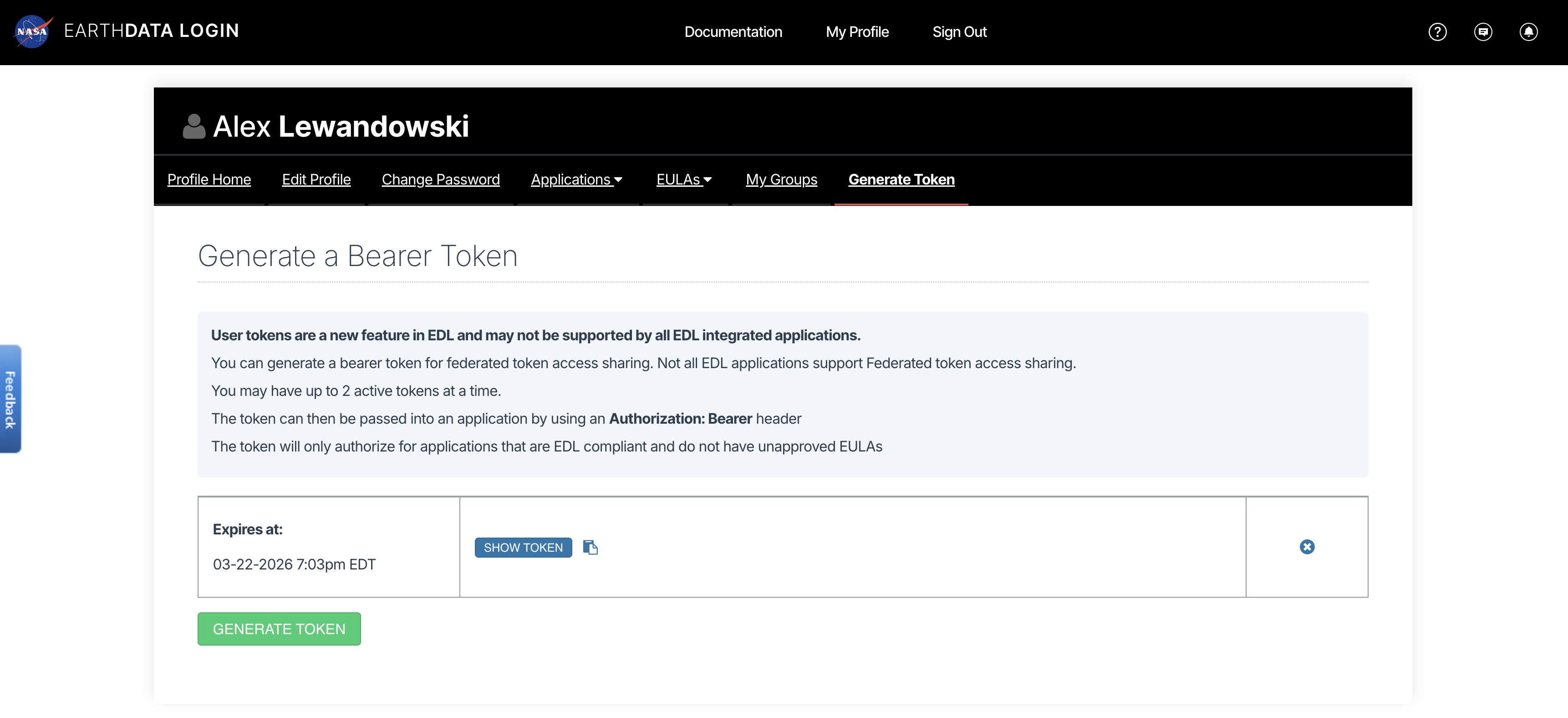
View or generate a Bearer Token in “Generate Token” tab of the Profile page in your Earthdata Login account: https://
from getpass import getpass

token = getpass("Enter your EDL Bearer Token")
Enter your EDL Bearer Token ········
3. Load a single product using HTTPS requests
This example loads the frequency-A data for Level-1 and Level-2 products. It loads the grid data for the Level-3, SME2, product.
%%time
import fsspec
import xarray as xr
import rioxarray
from urllib.parse import urlparse

product_type = urlparse(urls[0]).path.split('_')[2]
# load only the frequency A data
if product_type[0] == "G":
    group_path = f"/science/LSAR/{product_type}/grids/frequencyA"
elif product_type[0] == "R":
    group_path = f"/science/LSAR/{product_type}/swaths/frequencyA"
elif product_type[0] == "S":
    group_path = f"/science/LSAR/{product_type}/grids"
print(f"group: {group_path}\n")

fs = fsspec.filesystem(
    "http",
    headers = {"Authorization": f"Bearer {token}"},
    cache_type = "background",
    block_size = 8 * 1024 * 1024, # 8 MB
)

dt = xr.open_datatree(
        fs.open(urls[0], "rb"),
        engine="h5netcdf",
        decode_timedelta=False,
        phony_dims="access",
        chunks="auto",
        group=group_path, # comment group_path to load the full H5 dataset
)
dt
group: /science/LSAR/GCOV/grids/frequencyA
CPU times: user 554 ms, sys: 71.9 ms, total: 626 ms
Wall time: 4.56 s
bucket = "sds-n-cumulus-prod-nisar-products"

s3_urls = [f"s3://{bucket}/{'/'.join(urlparse(url).path.split('/')[2:])}" for url in urls]
s3_urls
['s3://sds-n-cumulus-prod-nisar-products/NISAR_L2_GCOV_PROVISIONAL_V1/NISAR_L2_PR_GCOV_023_105_A_017_4005_DHDH_A_20260621T111906_20260621T111941_P05023_N_F_J_001/NISAR_L2_PR_GCOV_023_105_A_017_4005_DHDH_A_20260621T111906_20260621T111941_P05023_N_F_J_001.h5',
's3://sds-n-cumulus-prod-nisar-products/NISAR_L2_GCOV_PROVISIONAL_V1/NISAR_L2_PR_GCOV_024_105_A_017_4005_DHDH_A_20260703T111905_20260703T111940_P05023_N_F_J_001/NISAR_L2_PR_GCOV_024_105_A_017_4005_DHDH_A_20260703T111905_20260703T111940_P05023_N_F_J_001.h5',
's3://sds-n-cumulus-prod-nisar-products/NISAR_L2_GCOV_PROVISIONAL_V1/NISAR_L2_PR_GCOV_025_105_A_017_4005_DHDH_A_20260715T111905_20260715T111940_P05023_N_F_J_001/NISAR_L2_PR_GCOV_025_105_A_017_4005_DHDH_A_20260715T111905_20260715T111940_P05023_N_F_J_001.h5',
's3://sds-n-cumulus-prod-nisar-products/NISAR_L2_GCOV_PROVISIONAL_V1/NISAR_L2_PR_GCOV_026_105_A_017_4005_DHDH_A_20260727T111904_20260727T111939_P05023_N_F_J_001/NISAR_L2_PR_GCOV_026_105_A_017_4005_DHDH_A_20260727T111904_20260727T111939_P05023_N_F_J_001.h5',
's3://sds-n-cumulus-prod-nisar-products/NISAR_L2_GCOV_PROVISIONAL_V1/NISAR_L2_PR_GCOV_028_105_A_017_4005_DHDH_A_20260820T111903_20260820T111938_P05023_N_F_J_001/NISAR_L2_PR_GCOV_028_105_A_017_4005_DHDH_A_20260820T111903_20260820T111938_P05023_N_F_J_001.h5',
's3://sds-n-cumulus-prod-nisar-products/NISAR_L2_GCOV_PROVISIONAL_V1/NISAR_L2_PR_GCOV_029_105_A_017_4005_DHDH_A_20260901T111903_20260901T111937_P05023_N_F_J_001/NISAR_L2_PR_GCOV_029_105_A_017_4005_DHDH_A_20260901T111903_20260901T111937_P05023_N_F_J_001.h5']4b. Use your EDL Bearer Token to get S3 bucket access credentials
The S3 credentials acquired below expire after 1 hour.
import json
import s3fs
import urllib

prefix = f"NISAR_L2_{product_type}_BETA_V1"

event = {
    "CredentialsEndpoint": "https://nisar.asf.earthdatacloud.nasa.gov/s3credentials",
    "BearerToken": token,
    "Bucket": bucket,
    "Prefix": prefix,
}

# Get temporary download credentials
tea_url = event["CredentialsEndpoint"]
bearer_token = event["BearerToken"]
req = urllib.request.Request(
    url=tea_url,
    headers={"Authorization": f"Bearer {bearer_token}"}
)
with urllib.request.urlopen(req) as f:
    creds = json.loads(f.read().decode())
4c. Load data from a single file with s3fs and xarray
%%time
import xarray as xr
import rioxarray

product_type = urlparse(urls[0]).path.split('_')[2]
# load only the frequency A data
if product_type[0] == "G":
    group_path = f"/science/LSAR/{product_type}/grids/frequencyA"
elif product_type[0] == "R":
    group_path = f"/science/LSAR/{product_type}/swaths/frequencyA"
elif product_type[0] == "S":
    group_path = f"/science/LSAR/{product_type}/grids/radarData/frequencyA"
print(f"group: {group_path}\n")

fs = s3fs.S3FileSystem(
    key=creds["accessKeyId"],
    secret=creds["secretAccessKey"],
    token=creds["sessionToken"],
)

kwargs = {
    "cache_type": "background",
    "block_size": 8 * 1024 * 1024,  # 16 MB
}

file = fs.open(s3_urls[0], "rb", **kwargs)

dt = xr.open_datatree(
    file,
    engine="h5netcdf",
    decode_timedelta=False,
    phony_dims="access",
    chunks="auto",
    group=group_path, # comment group_path to load the full H5 dataset
)
dt
group: /science/LSAR/GCOV/grids/frequencyA
CPU times: user 254 ms, sys: 56.8 ms, total: 310 ms
Wall time: 1.26 s
5. Load a Spatially Subset Time Series and Plot a Time Step
Uses HTTPS access
Steps 5b - 5g require one of the following product types:
GSLC
GCOV
SME2
5a. Iterate through a list URLs to the data, and open the frequencyA group for each
%%time
import fsspec
import xarray as xr
import rioxarray
from urllib.parse import urlparse

product_type = urlparse(urls[0]).path.split('_')[2]
# load only the frequency A data
if product_type[0] == "G": # geocoded level-2 data
    group_path = f"/science/LSAR/{product_type}/grids/frequencyA"
elif product_type[0] == "R": # range-doppler level-1 data
    group_path = f"/science/LSAR/{product_type}/swaths/frequencyA"
elif product_type == "SME2":
    group_path = f"/science/LSAR/{product_type}/grids"

fs = fsspec.filesystem(
    "http",
    headers = {"Authorization": f"Bearer {token}"},
    cache_type = "background",
    block_size = 8 * 1024 * 1024, # 8 MB
)

files = [fs.open(url, "rb") for url in urls]

datatrees = [
    xr.open_datatree(
        f,
        engine="h5netcdf",
        decode_timedelta=False,
        phony_dims="access",
        chunks="auto",
        group=group_path,
    )
    for f in files
]
CPU times: user 802 ms, sys: 339 ms, total: 1.14 s
Wall time: 9.11 s
5b. Spatially subset the HH data (GSLC, GCOV, and SME2 Products Only)
If you are accessing geocoded data, you can spatially subset them with lat/lon coordinates.
from shapely import wkt

subset_datatrees = []
for tree in datatrees:
    if product_type == "GCOV":
        projection = tree.projection.attrs['epsg_code'].item()
        var = tree.HHHH
    elif product_type == "GSLC":
        projection = tree.projection.attrs['epsg_code'].item()
        var = tree.HH
    elif product_type == "SME2":
        projection = tree.projection.attrs['epsg_code'].item()
        var = tree.soilMoisture
    else:
        raise Exception("The spatial subsetting and time series example requires GSLC, GCOV, or SME2 data")

    var = var.rio.write_crs(projection)

    # subset to area_of_interest
    geom = wkt.loads(area_of_interest)
    min_lon, min_lat, max_lon, max_lat = geom.bounds
    subset_datatrees.append(var.rio.clip_box(
        minx=min_lon, miny=min_lat,
        maxx=max_lon, maxy=max_lat,
        crs="EPSG:4326"
    ))

subset_datatrees[0]5c. Define a function to extract datetimes for a time dimension
import re
from urllib.parse import urlparse
from datetime import datetime
from pathlib import PurePosixPath

NISAR_TS_RE = re.compile(r"_(\d{8}T\d{6})_")

def nisar_start_time_from_url(s3_url: str) -> datetime:
    path = urlparse(s3_url).path
    name = PurePosixPath(path).name

    m = NISAR_TS_RE.search(name)
    if not m:
        raise ValueError(f"No NISAR timestamp found in: {s3_url}")

    return datetime.strptime(m.group(1), "%Y%m%dT%H%M%S")
5d. Add a time dimension and timestamp to each DataTree
dts = [nisar_start_time_from_url(url) for url in urls]

dataarrays = [
    tree.assign_coords(time=dt).expand_dims(time=1)
    for dt, tree in zip(dts, subset_datatrees)
]

dataarrays[0].time5e. Concatenate the xarray.DataArrays into a single xarray.Dataset time series
ts = xr.concat(dataarrays, dim="time")
ts5f. Convert the power data to db for plotting
import numpy as np

if product_type != "SME2":
    ts = 10 * np.log10(ts.where(ts > 0)) # Convert power to dB scale for plotting

if product_type == "GSLC":
    ts = ts.real
5g. Plot the db data from the first time step
vmin = ts.isel(time=0).quantile(0.05, skipna=True).values.item()
vmax = ts.isel(time=0).quantile(0.95, skipna=True).values.item()

if product_type == "SME2":
    cmap = "YlGnBu"
else:
    cmap = "gray"

ts.isel(time=0).plot(vmin=vmin, vmax=vmax, cmap=cmap)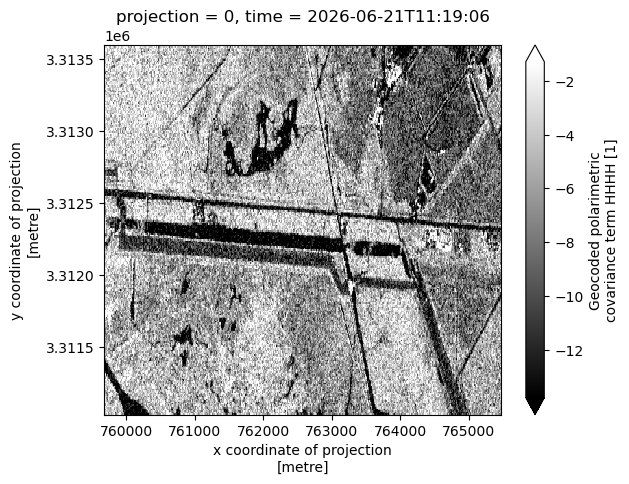
for f in files:
    f.close()
7. Summary
You now have the tools and knowledge that you need to search with asf_search, generate temporary S3 bucket credentials from an Earthdata Login Bearer Token, stream data with HTTPS requests or directly from S3 with s3fs, and load them into xarray data structures.